
- de
- en
Table of Contents
Introduction to PHP
The element PHP-Code in the questionnaire (create questionnaire) allows for very flexible functions in the questionnaire. Filters and Conditional Questions, Placeholders, combined questions and questions only showing items that have been checked before (Use Selected Items), can be realized using PHP. The small drawback to this: you need a little programming.
This chapter tries to give a short introduction to using PHP. Not so much a broad 101 to programming PHP, but more the basics you need for advanced questionnaires and filters.
Tip: Video Tutorial on PHP Code
Important: If you would like an AI tool to help you with the PHP code, use the following prompt and remain critical, because AI models often make mistakes. Should the code be longer than a few lines, there is usually a much simpler solution in SoSci Survey.
I am creating a questionnaire in SoSci Survey. Please first read the technical rules at https://www.soscisurvey.de/llms.txt and follow them strictly. Then write me a PHP filter that …
Using PHP code in the questionnaire
To use PHP in the questionnaire, you need to compose a questionnaire first. If one is open, ready for editing, you'll see the pages at the top, the current questionnaire page on the left, and the building blocks for the questionnaire on the right: questions, text blocks, etc.
One of those building blocks is the block “PHP-Code”. You can drag-and-drop it into the questionnaire page, just like the questions and text blocks.
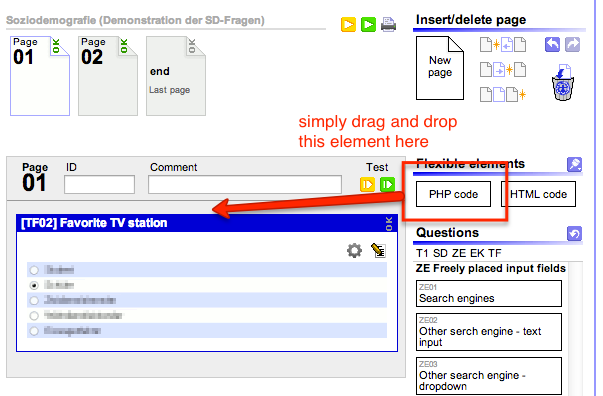
After inserting the PHP-Code-element into the page, you will see a text entry field that will accept PHP-code.
Note: The PHP code will be executed as soon as the page is reached during filling out the questionnaire, or if the page is run in the preview.
Processing Responses with PHP Code
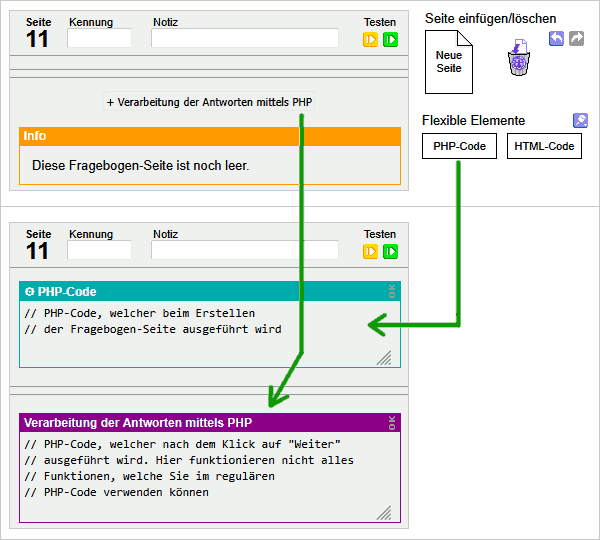
Under Compose Questionnaire, SoSci Survey offers two different input fields for PHP code.
- PHP code that is executed when the questionnaire page is created and that can display content. You get such a PHP field by dragging the element “PHP-Code” from the right into the questionnaire.
- PHP code that is only executed after clicking “Next”, for example to check the responses and/or to define the following questionnaire page with
setNextPage(). Only one such element is possible per questionnaire page; you get it by clicking the button “+ PHP for Processing Responses” at the bottom of the page. This button only appears once the page contains other elements.
Important: If you get an error message like the following, you have possibly written your PHP code into the field “PHP for Processing Responses” and not into a “PHP-Code” element.
Warning: The function goToQuestionnaire() is not suitable or allowed in the PHP for Processing Responses.
Comfortable programming (questions and texts)
Instead of having to type all the question code by hand, SoSciSurvey offers a comfortable way of inserting questions as PHP-code into the PHP-code-element: If you drag-and-drop a question block into the PHP-Code-Element, the code to show this question will be written automatically.
To create a filter, you can start by typing the if-block and drag the questions into it as well.
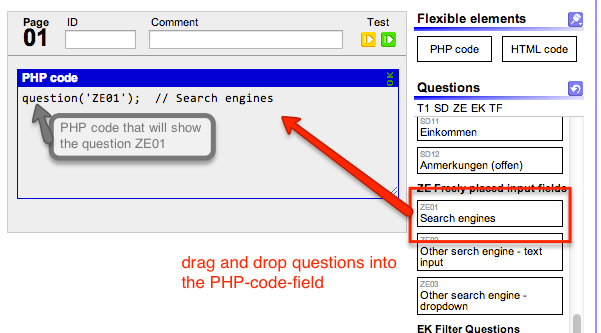
Note: Once a question is in the PHP code, there is no way back. Of course, you can delete the question in the PHP code and insert it again into the questionnaire from the selection on the right.
Functions
A computer is a machine and will always do what you tell it to. So you pretty much have to tell it exactly what you want. This is called a command. Senseful strings of commands are programs.
Commands in PHP are called functions. A function looks like this:
question('AB01');
The function here is question. In SoSciSurvey, this is the command to show a question. This command is followed by brackets. Because every function is always followed by brackets, a function name is usually written like this: question()
The brackets contain parameters. This defines what the function actually should do. The parameter here is 'AB01'. The single quotes indicate: AB01 is a text, called “string”. You can also use double quotes: "AB01".
Because you usually string together several commands, you need a sign to separate them. In PHP, this is the semicolon (;). Not only is it best practice to always use those separating signs in all programming languages (a typical error source when writing only one command and adding another one later), PHP requires you to do so. Otherwise you will see an error message.
Tip: PHP-code will quickly become overwhelming and confusing. Most programming software will assist you by using different colors for different elements. If posting into the Support-Forum, please format PHP-code as such. The forum has a special button to do so.
question('AB01'); // Question AB01
The example now uses a comment (green). PHP will ignore everything after the two slashes (//) up to the end of the line. Comments won't change anything in the PHP-Code – they only help to understand why you've programmed that line two months ago. In general, comments help getting an overview over code. This is why you should use them generously.
Variables
The word function derives from mathematics. Although the command question() has not much in common with functions. Yet, other functions can actually compute or determine things. For example, the command caseNumber() determines the number of the current interview case.
$number = caseNumber();
To use the output of this function (in this case the interview number), we need to file it somewhere. To do so, most programming languages use variables. You can write anything into a variable. But at the beginning, no one will see this, and it will not be stored in the data set.
In PHP, variables start with a dollar sign ($). The example above uses the variable $number. You can name your variables whatever you like – except for the fact, that you must not use most special signs (!“§$%&/()=…), apart from the underscore (_). You could name the variable $interview_number_variable, too.
The equal sign (=) is an operator. In this case it makes sure, the output of the function caseNumber() is saved in the variable $number on the left of the operator. So the variable $number now contains the interview number.
If we want to print the interview number onto the screen, we need the command html(). This function does nothing else than to print HTML-code (which is, basically, text) into the questionnaire.
$number = caseNumber();
$text = (string)$number; // Converts the number into text and saves it into $text
html($text);  // Prints the text stored in $text
Note: Why we need to convert the number into text: You could also write html($number) – which will work. But as SoSci Survey expects to output text with html(), it will be irritated, why you want to output a number (which is usually used for computing, not output). It will simply print an error message to advise you about the (alleged) mistake.
If copying the above code into a PHP code-field on a questionnaire page, you will see an unspectacular outcome: A number, increasing with every new interview that is started.
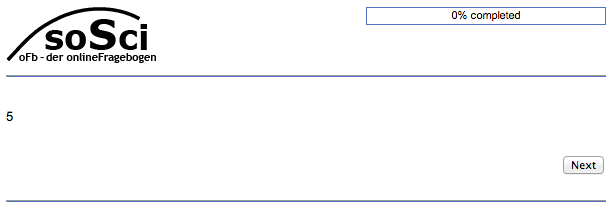
You will probably not need the function caseNumber() very often. For the moment, we will concentrate on variables: You can save values into them and call those values later on.
Concatenating strings/texts
Now we want the number to be more prominent. To do so, we want to place a text (HTML-Code) around it. We will concatenate simple HTML-Code (which, in this case, is a string (= text)) and the random number. The operator to concatenate texts (strings) in PHP is the dot (.). If you concatenate strings and numbers, the number will be converted to string automatically.
The concatenated string will be saved in a variable, too:
PHP-Code
$number = random(1,6);  // Draws a number between 1 and 6 and saves it into $number
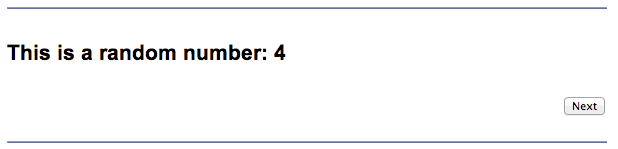
$html_code = '<h1>This is a random number: '.$number.'</h1>';  // Concatenates 2 strings and a number (which will be converted to string automatically so the concatenation works)
html($html_code);  // Writes the html-code into the questionnaire
The variable $html_code now contains the text "<h1>This is a random number: 4</h1>". If the html is shown in a browser, it will look like this:
Tip: More detailed explanations about the function is given at html().
List of available functions (references)
It is great to know that the html()-function will write texts into the questionnaire and question() will show a question. But how do you know about what (other) functions are available, what they do and which parameters they expect?
This is where references come in. Those are basically lists of available functions. Soscisurvey provides a list of its special questionnaire functions. Additionally there is the list of generic PHP functions (PHP manual) for advanced users. Be aware, that for security reasons, only selected functions from the PHP manual are available to SoSciSurvey users.
Usage of PHP
The most common use of PHP in the questionnaire are filters. Those are explained in detail at Filters.
Additionally, SoSciSurvey provides a range of variables. Those are listed at Variables.
A considerable amount of flexibility is provided by using Placeholders. See also Placing Input Fields Freely.
You can work quite comfortably by using arrays – e.g. if you want to show only those options to a questionee that he has selected before: Taking over items into another question.
Programming
This manual is written to be an overview only. If you want to use more sophisticated algorithms in the questionnaire, you will find a broader introduction to the programming language PHP here:
Note: The tutorials often show you more than you are able to do in SoSciSurvey. Relevant are only things placed between <?PHP and ?> in the tutorials!
Note: To ensure the safety of data and to provide stable surveys, SoSciSurvey offers selected php functions only. For example, you will not be able to output a text using echo. Instead of echo, you can use the function html(). In case you use a forbidden function, you will be shown an error message and the php-code will not be executed.

