
- de
- en
Table of Contents
Navigation in the Questionnaire
Usually, respondents start on the first page and then fill out the questionnaire sequentially. Sometimes the sequence is changed by setPageOrder() or goToPage(), but even then the respondents follow the sequence specified by the project manager.
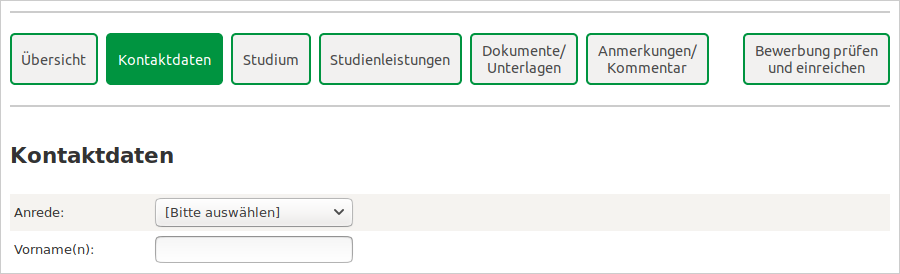
This manual describes how to add a menu or navigation to the questionnaire, so that respondents can jump between the pages/sections as they like. This is particularly useful if a form in SoSci Survey is used to collect information (see also Forms with Different Input Formats).
Basics
In the first step, page IDs are entered under Compose Questionnaire for all pages that the respondent shall be able to jump to. The title of the page is entered as Note.
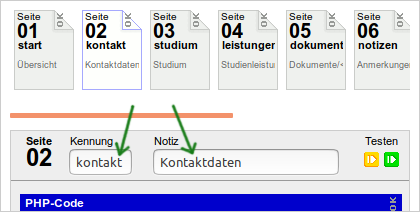
The actual navigation buttons are generated by the function buttonToPage(). This function creates HTML code, which can be included in the questionnaire page by means of html(). With the following PHP code, buttons to different pages would be offered on a questionnaire page.
html(
  '<div>'.
  buttonToPage('start').
  buttonToPage('contact').
  buttonToPage('study').
  buttonToPage('services').
  buttonToPage('documents').
  buttonToPage('notes').
  buttonToPage('submit').
  '</div>'
);

This PHP code would now have to be inserted on each individual page of the questionnaire (e.g., at the top of the page). Of course, this is impractical and makes subsequent changes more difficult. Therefore, a new function is defined under Compose Questionnaire in the tab PHP Functions, which takes care of the navigation and possibly further adjustments.
function navigation() {
    // Navigation
    html(
      '<div>'.
      buttonToPage('start').
      buttonToPage('contact').
      buttonToPage('study').
      buttonToPage('services').
      buttonToPage('documents').
      buttonToPage('notes').
      buttonToPage('submit').
      '</div>'
    );
    // Label of the next button
    option('nextbutton', 'Next form');
}
To use the function, the following PHP code is then required on each page of the questionnaire:
navigation();
Customizing the Layout
The arrangement on the page and the appearance of the buttons can be customized by means of CSS. First, some additions are made to the HTML code:
- In the outer
<div>block element, a gray border (border) at the top and bottom is added with thestyleattribute, - another
<div>block element with a CSS class (in the example “NavButtons”) is added around the buttons. The additional classs2flexallows using the full width. - An empty
<div>element is added between the buttons for “notes” and “submit” to create some space between the buttons.
html(
  '<div style="border: 2px solid #CCCCCC; border-left: 0 none; border-right: 0 none; padding: 20px 0 12px 0; margin-bottom: 3em;">'.
  '<div class="s2flex NavButtons" style="flex-wrap: wrap; margin-right: -8px">'.NL.
  buttonToPage('start').
  buttonToPage('contact').
  buttonToPage('study').
  buttonToPage('services').
  buttonToPage('documents').
  buttonToPage('notes').
  '<div style="width: 2em;"></div>'.
  buttonToPage('submit').
  '</div>'.
  '</div>'
);
To match this, CSS statements are added in the questionnaire layout in the HTML template within the <style> section:
div.NavButtons button {
  border: 2px solid %color.4%;
  border-radius: 5px;
  padding: 7px 6px;
  margin-bottom: 8px;
  flex-grow: 1;
  margin-right: 8px;
}
div.NavButtons button.currentPage {
  background-color: %color.4%;
  color: white;
}
The second block (button.currentPage) ensures that the navigation button of the current page is highlighted in color. The command buttonToPage() assigns the CSS class currentPage to the button that refers to the current page.
Displaying the Completion Status
If the order of filling out is not predefined, it can be helpful to show the respondent the current completion status – i.e., which pages have already been filled out completely and which have not.

For this purpose, further CSS statements are first added in the questionnaire layout, which display a green check mark behind complete pages and a red cross behind incomplete pages. Both symbols are defined in the UTF-8 character set and can be used (along with smileys and other symbols) by means of their character codes (2713 and 274C). The current page shall not show a symbol.
div.NavButtons button.complete:after { content: " \2713"; }
div.NavButtons button.incomplete:after { content: " \274C"; }
div.NavButtons button.currentPage:after { content: none; }
Whether or not the page has been filled out completely has to be checked by the PHP code with the help of value() or getItems(). The CSS classes complete and incomplete can then be specified as the fourth parameter of the function buttonToPage(). The second and third parameters remain empty with NULL.
The PHP code for this is stored in the PHP Functions of the questionnaire and could look as follows:
function navigation() {
    // Completion check
    $cContact = (count(array_merge(
        checkItem('KD02', 'KD01_01'),
        checkQst('KD01', [2,3,4,5,6,8]),
        checkItem('KD03', 'KD01_07')
    )) === 0);

    $cStart = (
      (count(array_intersect(getItems('KD01', 'valid'), [2,3,4,5,6,8])) == 6) and
      (value('KD02', 'code:ifany') > 0) and
      ((value('KD03', 'code:ifany') > 0) or (value('KD03', 'code:ifany') == -2))
    );

    // Further checks can be added here for ...
    // "study"     -> $cStudy
    // "services"  -> $cServices
    // "documents" -> $cDocuments
    // ... and so on.


    // Navigation
    html('<div style="border: 2px solid #CCCCCC; border-left: 0 none; border-right: 0 none; padding: 20px 0 12px 0; margin-bottom: 3em;">'.
      '<div class="s2flex NavButtons" style="flex-wrap: wrap; margin-right: -8px">'.NL.
      buttonToPage('start').
      buttonToPage('contact', NULL, NULL, ($cContact ? 'complete' : 'incomplete')).
      buttonToPage('study', NULL, NULL, ($cStudy ? 'complete' : 'incomplete')).
      buttonToPage('services', NULL, NULL, ($cServices ? 'complete' : 'incomplete')).
      buttonToPage('documents', NULL, NULL, ($cDocuments ? 'complete' : 'incomplete')).
      buttonToPage('notes').
      '<div style="width: 2em;"></div>'.
      buttonToPage('submit').
      '</div>'.
      '</div>'
    );
    option('nextbutton', 'Next form');
}


function checkQst($qID, $items) {
  $fail = [];
  foreach ($items as $item) {
    $answer = value(id($qID, $item), 'code:ifany');
    if (($answer < -3) or ($answer === '')) {
      $text = preg_replace('/:.*/', '', getItemtext($qID, $item));
      $fail[] = $text;
    }
  }
  return $fail;
}

function checkItem($varIDs, $textID) {
  $fail = [];
  if (!is_array($varIDs)) {
    $varIDs = [$varIDs];
  }
  foreach ($varIDs as $varID) {
    $answer = value($varID, 'code:ifany');
    if (($answer < -3) or ($answer === '')) {
      $text = preg_replace('/:.*/', '', getItemtext($textID));
      $fail[] = $text;
      // Only one of them
      break;
    }
  }
  return $fail;
}
Note: The 'code:ifany' in the value() command ensures that no error message appears if the corresponding question has not been asked in the questionnaire yet.
The following code snippet is responsible for assigning the CSS class complete or incomplete; it is entered in varied form as the fourth parameter of the function buttonToPage() in each case:
($cContact ? 'complete' : 'incomplete')
In this example, the buttons for “start”, “notes”, and “submit” do not get a status display.
What the PHP code for checking the completeness actually looks like depends on the individual case. The functions checkQst() and checkItem() can be helpful here. These functions are also designed to return a list of missing information. This way, an overview of what still has to be filled out can be displayed on the page “submit”.
Individual checks may also become more complicated and have to be moved into separate functions.
    $cStudy = (count(checkStudy()) === 0);
    $cServices = (count(checkECTS()) === 0);
    $cDocuments = (count(checkDocs()) === 0);

