
- de
- en
Table of Contents
Best-Worst (MaxDiff)
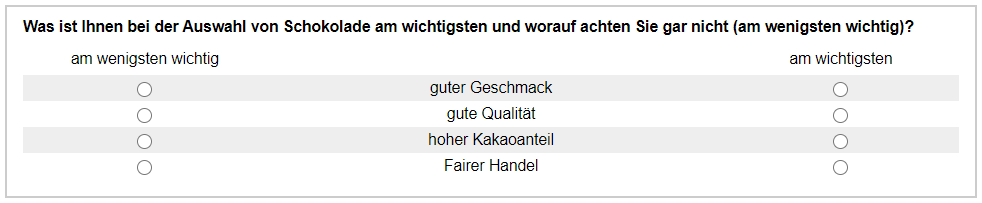
The question format Best-Worst or MaxDiff (Maximum Difference Scaling) is about deciding from different statements which is “most important” and which is “least important” for a participant. So it is about a maximum difference between two items.
In the example, the participant shall indicate which property is decisive for the choice.
Implementation
When creating a MaxDiff question, two selection questions become one combined question.
First, in the example, a section called “MaxDiff” is created with the identifier “MD” and consequently a selection question with the identifier “MD01” (for MaxDiff) (s. part_1_creating_questions. Within the question, the Question title is entered as well as the 4 characteristics (“good taste”, …) as answer options.
A description is required as a heading above the items (“least important”). The text is entered in the Selection Options tab in the Text on top of the options field and the Above input fields display option is selected. Under Position of input fields in the Alignment of Inputs the position left-hand is selected.
Now the question is saved and then duplicated ( ). It now looks like this in the preview:
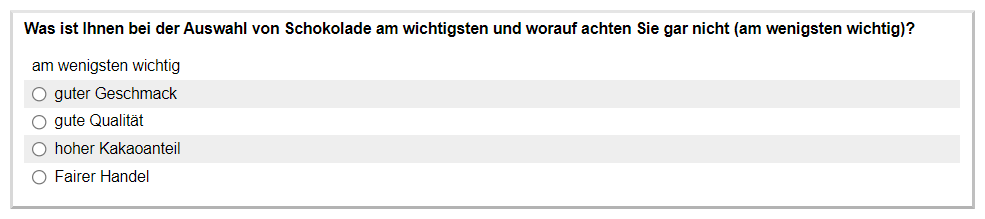
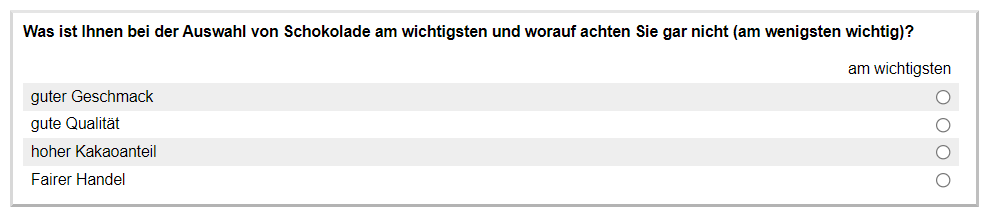
The duplicated question automatically gets the new identifier MD02 and is initially identical to MD01. In the new question, the Text on top of the options and the Alignment of Inputs are now changed. “Least important” becomes “most important” and the Position of input fields is changed to right-hand. After saving, it looks as follows:
Combine Questions
Under Compose Questionnaire, drag a PHP code element onto an empty page (Introduction to PHP). The following PHP code is entered as content.
question('MD01', 'combine=MD02', 'gap=none');
In this way, the two questions are combined into one question and the result looks like this:
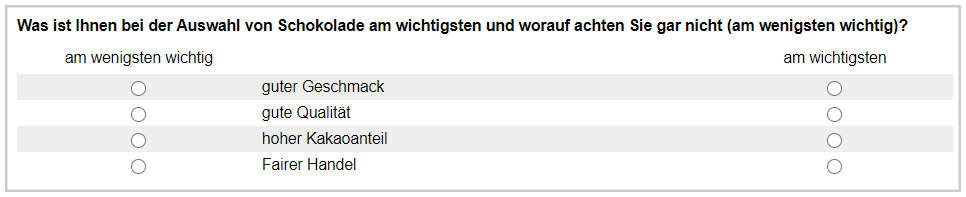
In order to display the question in the correct orientation, i.e. that the selection options are centered between the selection fields, CSS code must be added to the page using pageCSS:
question('MD01', 'combine=MD02', 'gap=none');

pageCSS('
  td.s2col2 {
    text-align: center;
  }
');
This CSS code tells the browser to center-align the second column (s2col2) – in this case, that's the properties column. Note that this may also affect other questions that may still have been placed on the page. In this case, the question identifier can still be placed in front of the CSS code: #MD01_qst td.s2col2 {….
After editing the code, the question with the selection options will appear in the center:
Refinement
If you want to prevent that an item can be selected as the best and the worst option at the same time, JavaScript is required. In the list of questions, create a “new text” with the display “HTML code” and the following content.
<script>
function BestWorst(leftID, rightID) {

    // Collect the options
    let leftOptions = document.querySelectorAll('input[name="' + leftID + '"]');
    let rightOptions = document.querySelectorAll('input[name="' + rightID + '"]');

    let count = Math.min(leftOptions.length, rightOptions.length);

    // If any is selected, the counterpart is disabled and unselected
    function updateBlocking() {
        for (let i=0; i<count; i++) {
            if (leftOptions[i].checked) {
                rightOptions[i].checked = false;
                rightOptions[i].disabled = true;
            } else {
                rightOptions[i].disabled = false;
            }

            if (rightOptions[i].checked) {
                leftOptions[i].checked = false;
                leftOptions[i].disabled = true;
            } else {
                leftOptions[i].disabled = false;
            }
        }
    }

    // Enable listeners
    for (let i=0; i<count; i++) {
        leftOptions[i].addEventListener("click", updateBlocking);
        rightOptions[i].addEventListener("click", updateBlocking);
    }

    // Initial check
    updateBlocking();
}

document.addEventListener("DOMContentLoaded", function () {
    new BestWorst("%leftName%", "%rightName%");
});

</script>
For the further example, we assume that the text has the ID “JS01”. Now include this text and a little CSS code below your combined question. You have to enter the IDs of the two partial questions a second time in show().
question('MD01', 'combine=MD02', 'gap=none');

// JavaScript code
show('JS01', [
  '%leftName%' => 'MD01',
  '%rightName%' => 'MD02',
]);

pageCSS('
  td.s2col2,
  th.s2col1,
  th.s2col3 {
    text-align: center;
  }
  input[disabled] {
    opacity: 0.5;
  }
');

